MemLabs Lab 6: The Reckoning
Introduction to MemLabs
Before we dive into the challenge, let’s introduce MemLabs, a collection of CTF-style memory forensics challenges created by Abhiram Kumar (@stuxnet999). MemLabs is designed for practitioners who want to build practical memory analysis skills in a structured environment.
The series features six main labs (Lab 1 through Lab 6), with scenarios ranging from basic process inspection to multi-stage incident investigations. What makes MemLabs particularly useful is how realistic the artifacts are; they mirror actual digital forensics and incident response (DFIR) investigations.
You can find the challenges in the MemLabs repository.
Here, we tackle Lab 6 (“The Reckoning”), widely considered one of the most comprehensive challenges in the set. This scenario tests our ability to correlate artifacts across memory structures, think through an investigation step by step, and use Volatility plugins alongside raw carving to reconstruct what happened.
Challenge overview: Lab 6 - The Reckoning
The scenario
We have received a memory dump from an intelligence agency. According to the briefing, this evidence may hold secrets belonging to David Benjamin, an underworld crime ring operator.
The memory dump was captured from one of David’s associates who was apprehended by investigators earlier in the week. Our role is to analyze this memory snapshot and uncover incriminating material.
The briefing gives us an important lead: David communicated with his associates over the internet. That hint points our focus toward browser activity, external download links, network caches, and active processes.
Challenge specifications
- Challenge name: MemLabs Lab 6 - The Reckoning
- File:
MemoryDump_Lab6.raw - File hash (MD5):
405985dc8ab7651c65cdbc04cb22961c - Flag format:
inctf{s0me_l33t_Str1ng} - Flag structure: Split into two parts that must be combined
- Target architecture: Windows x64
Official description
“We received this memory dump from the Intelligence Bureau Department. They say this evidence might hold some secrets of the underworld gangster David Benjamin. This memory dump was taken from one of his workers whom the FBI busted earlier this week. Your job is to go through the memory dump and see if you can figure something out. FBI also says that David communicated with his workers via the internet so that might be a good place to start.”
Note: This challenge is composed of 1 flag split into 2 parts.
Investigation strategy
Before jumping into plugins, let’s organize our investigative plan based on the scenario:
- System identification: Determine the OS profile and symbols using
windows.info. - Process survey: Map active and parent-child processes using
windows.pslistandwindows.pstree. - Internet activity triage: Given the hint about online communication, prioritize:
- Browser processes (Chrome and Firefox)
- Network connections via
windows.netscan - Browser history and cached URLs
- String search: Look for credential fragments and encryption keys in memory.
- Archive analysis: Investigate archive utilities (like WinRAR) and carve referenced files.
- Environment inspection: Check process environment variables for operational security slips.
Part 1: Finding the first flag fragment
Identifying the operating system
Our first step is determining the kernel architecture and matching symbol tables:
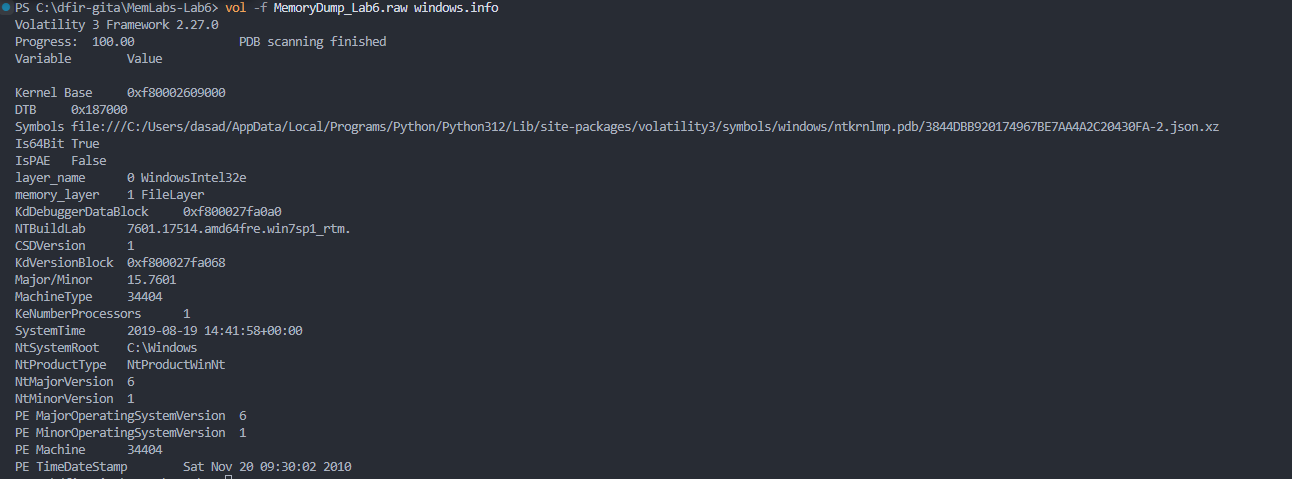
vol -f MemoryDump_Lab6.raw windows.info
The output confirms that the image is a 64-bit Windows 7 SP1 memory dump (build 7601). Knowing the architecture up front is essential because 64-bit Windows uses four-level PML4 paging for virtual address translation, and kernel structure offsets for types like _EPROCESS differ between 32-bit and 64-bit builds.
Surveying running processes
Next, we run windows.pslist to see what was active on the suspect’s computer:
vol -f MemoryDump_Lab6.raw windows.pslist
PID     PPID    ImageFileName   Offset(V)       Threads Handles SessionId       Wow64   CreateTime      ExitTime       File output

4       0       System  0xfa80012a5040  78      495     N/A     False   2019-08-19 14:40:07.000000 UTC  N/A     Disabled
264     4       smss.exe        0xfa8002971470  2       29      N/A     False   2019-08-19 14:40:07.000000 UTC  N/A    Disabled
336     328     csrss.exe       0xfa800234cb30  10      415     0       False   2019-08-19 14:40:10.000000 UTC  N/A    Disabled
384     328     wininit.exe     0xfa8002aae910  3       74      0       False   2019-08-19 14:40:11.000000 UTC  N/A    Disabled
396     376     csrss.exe       0xfa8002ab7060  9       499     1       False   2019-08-19 14:40:11.000000 UTC  N/A    Disabled
436     376     winlogon.exe    0xfa8002b66560  6       116     1       False   2019-08-19 14:40:11.000000 UTC  N/A    Disabled
480     384     services.exe    0xfa8002b99200  9       194     0       False   2019-08-19 14:40:11.000000 UTC  N/A    Disabled
496     384     lsass.exe       0xfa8002bb4600  7       513     0       False   2019-08-19 14:40:11.000000 UTC  N/A    Disabled
504     384     lsm.exe 0xfa80022ff910  10      152     0       False   2019-08-19 14:40:11.000000 UTC  N/A     Disabled
608     480     svchost.exe     0xfa8002ce8740  10      358     0       False   2019-08-19 14:40:11.000000 UTC  N/A    Disabled
668     480     VBoxService.ex  0xfa8002d13060  13      136     0       False   2019-08-19 14:40:11.000000 UTC  N/A    Disabled
724     480     svchost.exe     0xfa8002d4bb30  6       257     0       False   2019-08-19 14:40:11.000000 UTC  N/A    Disabled
780     480     svchost.exe     0xfa8002d4fb30  19      405     0       False   2019-08-19 14:40:11.000000 UTC  N/A    Disabled
896     480     svchost.exe     0xfa8002dcf5f0  22      452     0       False   2019-08-19 14:40:12.000000 UTC  N/A    Disabled
948     480     svchost.exe     0xfa8002de1b30  35      893     0       False   2019-08-19 14:40:12.000000 UTC  N/A    Disabled
1008    780     audiodg.exe     0xfa8002e0b1c0  7       132     0       False   2019-08-19 14:40:12.000000 UTC  N/A    Disabled
400     480     svchost.exe     0xfa8002e645f0  13      275     0       False   2019-08-19 14:40:12.000000 UTC  N/A    Disabled
1052    480     svchost.exe     0xfa8002eac740  17      368     0       False   2019-08-19 14:40:12.000000 UTC  N/A    Disabled
1176    480     spoolsv.exe     0xfa8002e76b30  14      279     0       False   2019-08-19 14:40:13.000000 UTC  N/A    Disabled
1212    480     svchost.exe     0xfa8002f4d780  21      311     0       False   2019-08-19 14:40:13.000000 UTC  N/A    Disabled
1308    480     svchost.exe     0xfa8002f79b30  17      253     0       False   2019-08-19 14:40:13.000000 UTC  N/A    Disabled
1812    480     taskhost.exe    0xfa8003144250  9       147     1       False   2019-08-19 14:40:18.000000 UTC  N/A    Disabled
1868    896     dwm.exe 0xfa8003160120  4       70      1       False   2019-08-19 14:40:18.000000 UTC  N/A     Disabled
1876    948     taskeng.exe     0xfa8003164b30  5       81      0       False   2019-08-19 14:40:18.000000 UTC  N/A    Disabled
1944    1844    explorer.exe    0xfa800319a060  35      894     1       False   2019-08-19 14:40:19.000000 UTC  N/A    Disabled
1292    1928    GoogleCrashHan  0xfa8003227060  7       105     0       True    2019-08-19 14:40:19.000000 UTC  N/A    Disabled
924     1928    GoogleCrashHan  0xfa8003219060  6       93      0       False   2019-08-19 14:40:19.000000 UTC  N/A    Disabled
1108    1944    VBoxTray.exe    0xfa8003277810  14      139     1       False   2019-08-19 14:40:20.000000 UTC  N/A    Disabled
880     1944    cmd.exe 0xfa8002324b30  1       21      1       False   2019-08-19 14:40:26.000000 UTC  N/A     Disabled
916     396     conhost.exe     0xfa800231e370  3       50      1       False   2019-08-19 14:40:26.000000 UTC  N/A    Disabled
856     480     SearchIndexer.  0xfa8003315060  13      689     0       False   2019-08-19 14:40:27.000000 UTC  N/A    Disabled
2124    1944    chrome.exe      0xfa800234eb30  27      662     1       False   2019-08-19 14:40:46.000000 UTC  N/A    Disabled
2132    2124    chrome.exe      0xfa800234f780  9       75      1       False   2019-08-19 14:40:46.000000 UTC  N/A    Disabled
2168    2124    chrome.exe      0xfa800314fab0  3       55      1       False   2019-08-19 14:40:49.000000 UTC  N/A    Disabled
2292    608     WmiPrvSE.exe    0xfa80032d9060  13      288     0       False   2019-08-19 14:40:52.000000 UTC  N/A    Disabled
2340    2124    chrome.exe      0xfa80032f9a70  12      282     1       False   2019-08-19 14:40:52.000000 UTC  N/A    Disabled
2440    2124    chrome.exe      0xfa8003741b30  13      263     1       False   2019-08-19 14:40:54.000000 UTC  N/A    Disabled
2452    2124    chrome.exe      0xfa800374bb30  14      167     1       False   2019-08-19 14:40:54.000000 UTC  N/A    Disabled
2800    480     WmiApSrv.exe    0xfa8002b74060  6       115     0       False   2019-08-19 14:40:57.000000 UTC  N/A    Disabled
2896    608     WmiPrvSE.exe    0xfa8002d9eab0  7       124     0       False   2019-08-19 14:40:57.000000 UTC  N/A    Disabled
2940    2124    chrome.exe      0xfa80032d4380  9       172     1       False   2019-08-19 14:41:06.000000 UTC  N/A    Disabled
2080    3060    firefox.exe     0xfa8003905b30  59      970     1       True    2019-08-19 14:41:08.000000 UTC  N/A    Disabled
2860    2080    firefox.exe     0xfa80021fa630  11      210     1       True    2019-08-19 14:41:09.000000 UTC  N/A    Disabled
3016    2080    firefox.exe     0xfa80013a4580  31      413     1       True    2019-08-19 14:41:10.000000 UTC  N/A    Disabled
2968    2080    firefox.exe     0xfa8001415b30  22      323     1       True    2019-08-19 14:41:11.000000 UTC  N/A    Disabled
3316    2080    firefox.exe     0xfa8001454b30  21      307     1       True    2019-08-19 14:41:13.000000 UTC  N/A    Disabled
3716    1944    WinRAR.exe      0xfa80035e71e0  7       201     1       False   2019-08-19 14:41:43.000000 UTC  N/A    Disabled
4084    1944    DumpIt.exe      0xfa800156e400  5       46      1       True    2019-08-19 14:41:55.000000 UTC  N/A    Disabled
4092    396     conhost.exe     0xfa80014c1060  2       50      1       False   2019-08-19 14:41:55.000000 UTC  N/A    Disabled
1224    480     sppsvc.exe      0xfa80014aa060  5       0       0       False   2019-08-19 14:42:39.000000 UTC  N/A    Disabled
2256    2396    GoogleUpdate.e  0xfa800157eb30  3       118     0       True    2019-08-19 14:42:40.000000 UTC  N/A    Disabled
1192    2256    GoogleCrashHan  0xfa80014f9060  3       46      0       True    2019-08-19 14:42:41.000000 UTC  N/A    Disabled
864     2256    GoogleCrashHan  0xfa80035e3700  1       1279459345      0       False   2019-08-19 14:42:41.000000 UTC N/A      Disabled
Scanning through the output, several processes catch our attention:
chrome.exe(PID 2124) with multiple renderer and utility child processesfirefox.exe(PID 2080) with tab subprocessesWinRAR.exe(PID 3716) indicating archive compression or extraction activitycmd.exe(PID 880) indicating interactive command-line activityDumpIt.exe(PID 4084) which was used to capture this memory dump
Having both Chrome and Firefox running points to split browser activity. The suspect may have used one browser for regular web browsing and the other for covert communication. Given the lead about online communication, browsers are our primary target. WinRAR is also worth noting, as archives are often used to package stolen data or hold encrypted materials.
Inspecting browser history
Since Chrome was running, we investigate its browsing history using the chromehistory plugin.
Chrome commits history to an SQLite database on disk (History), but active browser sessions hold SQLite page buffers, URL strings, and visited tab metadata in virtual memory. The plugin scans process memory for SQLite structures and Chrome URL patterns, recovering browsing activity even if the user cleared history on disk.
volatility --plugins=/path/to/plugins -f MemoryDump_Lab6.raw --profile=Win7SP1x64 chromehistory
The output reveals a visit to a Pastebin URL:
https://pastebin.com/RSGSi1hk
Following the redirect link
When we check the paste content (or recover it from memory strings), we discover an outbound Google redirect link:
https://www.google.com/url?q=https://docs.google.com/document/d/1lptcksPt1l_w7Y29V4o6vkEnHToAPqiCkgNNZfS9rCk/edit?usp%3Dsharing&sa=D&source=hangouts&ust=1566208765722000&usg=AFQjCNHXd6Ck6F22MNQEsxdZo21JayPKug
Examining the Google Document
Following the Google Docs URL leads to a document with a cloud storage link:
https://mega.nz/#!SrxQxYTQ
The link is incomplete. Standard Mega URLs use a two-part format:
https://mega.nz/#!<file_id>!<decryption_key>
We have the file ID (SrxQxYTQ), but Mega uses client-side AES decryption where the key is passed in the URL fragment after the second exclamation mark. Without that key, Mega will not decrypt the download payload.
The document includes a short message:
“But David sent the key in mail. The key is… :(”
The decryption key was sent via email. Since the suspect read the email in a webmail tab or messaging client, that text had to pass through physical RAM when the browser fetched it.
Carving the Mega decryption key from memory
We can search raw memory strings for the phrase mentioned in the note:
strings -a -e l MemoryDump_Lab6.raw | grep -i "The key is"
# Or searching single-byte ASCII:
strings -a MemoryDump_Lab6.raw | grep -i "The key is"
The command yields:
The key is: zyWxCjCYYSEMA-hZe552qWVXiPwa5TecODbjnsscMIU
When David’s associate opened the email, the browser loaded the message into memory. Even after the tab was closed, the raw bytes persisted in RAM.
Now we append this key to complete the Mega URL:
https://mega.nz/#!SrxQxYTQ!zyWxCjCYYSEMA-hZe552qWVXiPwa5TecODbjnsscMIU
Downloading the file gives us flag1.png.
Diagnosing the corrupted PNG file
When we try to open flag1.png in an image viewer, it fails with a decoding error.
When an image refuses to render, the first thing to check is the file header and chunk structure. Let’s inspect the binary header with xxd:
xxd flag1.png | head -n 5
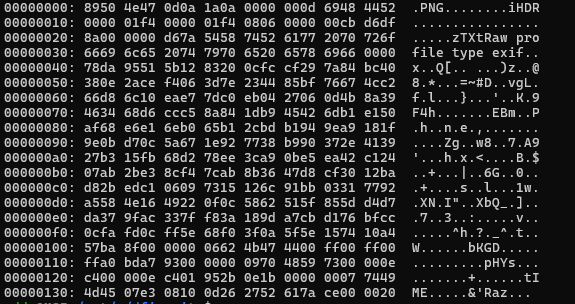
A valid PNG file requires an 8-byte file signature followed immediately by the 4-byte length and 4-byte chunk type for the Image Header (IHDR):
89 50 4E 47 0D 0A 1A 0A  [PNG file signature]
00 00 00 0D 49 48 44 52  [IHDR chunk: length 13, name 'IHDR']
In our downloaded file, offset 0x0C contains 0x69 (lowercase i) instead of 0x49 (uppercase I):
89 50 4E 47 0D 0A 1A 0A
00 00 00 0D 69 48 44 52  [Broken: 'iHDR']
In the PNG specification, chunk name capitalization conveys meaning: an uppercase first letter indicates a critical chunk that every conformant decoder must process. Because of the lowercase i, strict decoders treat iHDR as an invalid chunk and fail.
Repairing the PNG header
We can patch byte 0x0C using a short Python script:
with open("flag1.png", "rb") as f:
    data = bytearray(f.read())

data[12] = 0x49  # replace 'i' (0x69) with 'I' (0x49)

with open("flag1_fixed.png", "wb") as f:
    f.write(data)
Opening the patched file displays the first part of our flag:
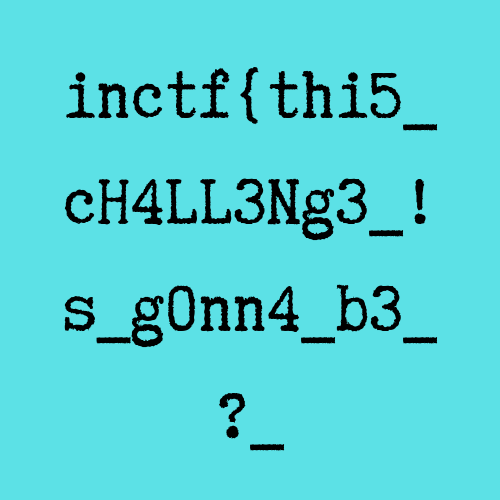
inctf{thi5_cH4LL3Ng3_!s_g0nn4_b3_
Part 2: Finding the second flag fragment
Tracking WinRAR execution
To locate the second half of the flag, we turn to the active WinRAR.exe process (PID 3716) we spotted in the process survey. We use windows.cmdline to inspect its arguments:
vol -f MemoryDump_Lab6.raw windows.cmdline
Filtering for WinRAR:
PID: 3716
Process: WinRAR.exe
CommandLine: "C:\Program Files\WinRAR\WinRAR.exe" "C:\Users\Jaffa\Desktop\pr0t3ct3d\flag.rar"
The user opened flag.rar from user Jaffa’s desktop. This archive likely holds the second half of our flag.
Carving the archive from memory
We scan memory for the file object using windows.filescan:
vol -f MemoryDump_Lab6.raw windows.filescan | grep -i "flag.rar"
Output:
0x5fcfc4b0 \Users\Jaffa\Desktop\flag.rar
With the virtual address of the _FILE_OBJECT structure confirmed, we carve the mapped file from memory using windows.dumpfiles:
vol -f MemoryDump_Lab6.raw -o ./extracted windows.dumpfiles --virtaddr 0x5fcfc4b0
This writes file.0x5fcfc4b0.0xfa8003668870.dat to the output folder. When we run unrar on the carved archive, it asks for a password:
unrar x file.0x5fcfc4b0.0xfa8003668870.dat
# Enter password (will not be echoed):
Extracting passwords from environment variables
In Windows, process environment variables live in user-mode memory inside the Process Environment Block (PEB), specifically under _RTL_USER_PROCESS_PARAMETERS->Environment. This table inherits system variables and holds process-specific configurations.
We scan the environment block with windows.envars:
vol -f MemoryDump_Lab6.raw windows.envars --pid 3716
Inside the variable list for the WinRAR process:
PID     Process         Variable        Value
3716    WinRAR.exe      RAR_password    easypeasyvirus
The archive password was stored directly in an environment variable: easypeasyvirus.
Extracting the second flag
Now we unpack the RAR archive by supplying the password:
unrar x -peasypeasyvirus file.0x5fcfc4b0.0xfa8003668870.dat
The archive extracts flag2.png. Opening it reveals the second flag fragment:

aN_Am4zINg_!_i_gU3Ss???_}
Flag assembly
Joining both fragments gives us the complete flag:
inctf{thi5_cH4LL3Ng3_!s_g0nn4_b3_aN_Am4zINg_!_i_gU3Ss???_}
Summary of recovered artifacts
- System profile: Windows 7 SP1 x64 (build 7601) identified via
windows.info. - Browser history: In-memory Chrome SQLite history recovered via
chromehistory, leading to Pastebin (RSGSi1hk) and a Google Doc with a truncated Mega link. - Decryption key: Carved the Mega AES key (
zyWxCjCYYSEMA-hZe552qWVXiPwa5TecODbjnsscMIU) directly from raw memory strings. - Header patch: Fixed offset
0x0Cofflag1.pngfrom0x69(iHDR) to0x49(IHDR) to recover the first flag fragment. - Archive carving: Located
\Users\Jaffa\Desktop\flag.rarvia kernel file object at0x5fcfc4b0and extracted it usingwindows.dumpfiles. - Credential recovery: Found
RAR_password=easypeasyvirusin the WinRAR process environment block to unpackflag2.png.